Word Combiner
& Portmanteau Generator
Combiner two or more words, names, or letters into one with our free online word combiner generator, no signup, no data saving.
You have the perfect username in mind. It’s taken. Or you’re naming a new puppy and want something that’s actually yours. Maybe you need a brand name for your Shopify store that doesn’t sound like fifty others already out there.
A word combiner mashes two words into something new. Breakfast + lunch = brunch. Brad + Angelina = Brangelina, that’s a couple name, and it’s one of the most fun things this tool does. Type in your words, hit generate, and you get a pile of combinations — most of them surprisingly usable, a few of them genuinely clever.
Beats sitting there for half an hour trying to smash syllables together in your head.
What Is a Word Combiner?
Ever felt stuck when trying to think of a new name? That is where a word combiner comes in! A word combiner is a resourceful combination generator and one of the best word-combining tools you can use to create something fresh. To combine words means you merge, blend, or create a fusion of two different terms. You can think of it as a mashup, a union, or a hybrid. Whether you want to remix, mix, or fuse words, this process of joining is like a linguistic conjunction or synthesis. It is a total amalgamation of your vocabulary and dictionary.
When you use this tool, you can take a word or a name and create a combined version. This is how word-formation compounds work. You might create a portmanteau (or several portmanteaus), which are combination words made from conjoined writing. In linguistics, this is called a linguistic blend. This process helps you invent neologisms, which are just newly coined words. It is a great source of invention and inspiration for original terms.
By mixing meanings, you can create a similar new meaning or a new expression. A complex single term can give your project more flavor, personality, and memorability. It helps build an identity that is memorable and fresh, yet familiar enough for recognition. It acts as a shortcut for memory and recall. When you have two related or complementary concepts, you can put them in the right context to make a new word.
Here are some famous examples of combined origin words:
Combined Word | Original Words | Meaning/Source |
Smog | Smoke + Fog | Polluted air |
Brunch | Breakfast + Lunch | Late morning meal |
Motel | Motor + Hotel | Roadside lodging |
Spork | Spoon + Fork | Hybrid cutlery |
Podcast | iPod + Broadcast | Digital audio |
Emoticon | Emotion + Icon | Digital face |
Glamping | Glamorous + Camping | Fancy camping |
Hangry | Hungry + Angry | Grumpy from hunger |
Staycation | Stay + Vacation | Holiday at home |
Bromance | Brother + Romance | Close male friendship |
Athleisure | Athletic + Leisure | Sporty casual wear |
Guesstimate | Guess + Estimate | Rough calculation |
Netiquette | Network + Etiquette | Online manners |
Fanzine | Fan + Magazine | Fan-made book |
Telethon | Television + Marathon | Charity broadcast |
Bollywood | Bombay + Hollywood | Indian film industry |
Whether you are making a “whomp” or something more professional, this tool makes it easy! Check out all our name combiners.
How the Word Combiner Works
My word combiner is a powerful software tool. This software automates the hard work using an AI-powered system. It uses a mix of AI, rule-based logic, and machine learning to handle every string of text you enter. An instant algorithm and advanced algorithms follow strict linguistic rules to ensure the results make sense.
The tool looks at phonetics and structures to apply a structured blending rule. By keeping the results structured and phonetically coherent, the tool uses smoothing to give you smoother results. It starts with foundational blends for name blending. It looks for an overlap in the words, using syllable slicing and phonetic hints. This linguistic overlapping involves slicing, swapping, and interlocking the front and back of the words.
Sometimes the words are mixed, interwoven, or the tool uses a base overlapping meaning to capture the combined essence of a pair. The tool tries the words in both orders and creates sequences using a pairwise combo. To keep the list clean, it uses duplicate removal before it decides to recombine.
The technical process includes:
- Concatenation: Creating straight concatenations.
- Blended Form: Creating compact merges through a morpher.
- Overlap-based shared merge point: Finding the best spot to join.
- Prefix-suffix mashups: Using initial syllable-based natural breaks.
- First-second blend method: Following the rhythmic structure of speech.
By focusing on phonemes and natural breaks, the output remains fluid, harmonious, and intuitive. This makes the words easy to pronounce because the sounds and syllables match. The tool finds the root syllable for the cleanest blends by matching phonemes and overlapping sounds. This careful order and structure in the process of automation allows the tool to generate instantly, providing high performance instead of just a raw list.

How to Use the Word Combiner (Step-by-Step Guide)
Using my free online tool is simple. There is no signup, no payment, and no steep learning curve. You get free access to all features immediately. Here is a step-by-step manual to get you started:
- Input Your Words: Find the input box. Enter your first word in the first text field and your second word in the second input word box.
- Combine: Click the “combine” button to generate your results.
- Browse the Output: A generated list will appear. You can browse, choose, and explore the results. The output is shown in tables, lists, or a grid for better detail.
- Manage Your Results: You can copy the words using copy buttons, or you can download, export, and save your favorite result. You can even share your finds with others!
- Tweak and Experiment: If you want more options, use the “load more” button. If you want to start over, click “clear all” or “reset” to clear sessions.
Want to play around? Try these tips for experimentation:
- Shuffle: Use the shuffle or reshuffle button. This regenerates the list and reorders the words, almost like rolling dice.
- Customize: You can tweak and adjust the settings based on your preferences.
- Edit: Paste your words, then proofread and edit the answers to make them perfect.
This one-click usage means you can get answers instantly without needing a complex account.

Key Features That Make Our Word Combiner Stand Out
I designed this tool to be dependable and flexible. It is completely free and unlimited, with an intuitive interface and a clean, user-friendly design.
Here are the standout features:
- Customization & Flexibility:
- Blend Styles: Choose your blend style (light, medium, or heavy blending).
- Length Controls: Set a min length and use max controls to set the maximum length.
- Filters: Use a filter to set a specific range for your words.
- Separators: Choose a separator like a hyphen, underscore, space, or select “no separator.”
- Case Style: Switch between lowercase, uppercase, title case, lower, or caps.
- High Output Quality:
- The results are readable, pronounceable, and meaningful.
- I make sure the meanings are clear, the words are cleaner, and the results are distinct and original.
- The structured, phonetic, and coherent output is professional-grade.
- Speed and Access:
- This is a fast, powerful tool with no restrictions, paywalls, trial versions, paid upgrades, or subscriptions.
- You can generate names with incredible speed.
- Saving and Sharing:
- Save favorites and use team sharing to review your list.
- Export, download, or copy your favorites.
- You can star individual words and save them to a plain text file for a personal export.
- One-click usage and clear buttons mean you don’t need technical expertise.

Word Combiner vs. Other Word Tools
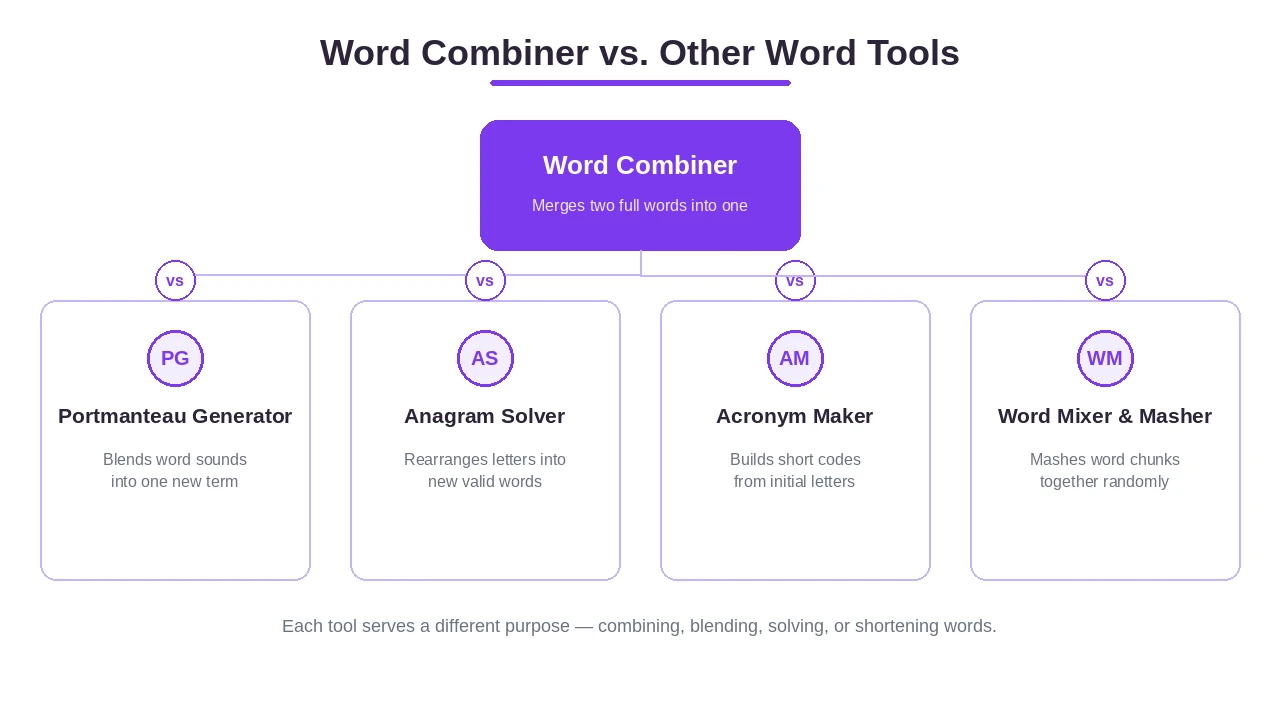
When you make a comparison between my tool and others, the distinctions are clear. The main difference is clarity. While some tools are basic or cluttered with ads, my toolkit provides a standard clear experience with richer results.
The distinction is that tool-generated original merges offer more versatility than manual possibilities. This tool is predictable, dependable, and efficient. It is a versatile brainstorming buddy and a creative playground that helps you unlock generated inspiration and boost your creativity.
vs. Portmanteau Generator
A portmanteau generator focuses specifically on portmanteau generation. It fuses and combines words into a mashup creator tool using a linguistic blend. My tool uses overlapping and syllable awareness to make careful cuts between one-syllable and two-syllable words. This creates blended options and a blended form based on foundational blends. The results are meaningful, pronounceable, and use natural breaks. By interlocking sounds, the words stay fluid, harmonious, and recognizable. It ensures a balanced result where the final dominant word has the right prominence, keeping it structured, phonetic, and coherent.
vs. Anagram Solver & Unscrambler
An anagram solver or unscrambler works differently. It takes scrambled letters and rearranges the single letter order. It deals with random letters and characters to solve a jumble, which is great for games, puzzles, and Scrabble for a competitive solve. Doing this manually can feel chaotic. An unscrambler is like a breaker—it is splitting, shifting, and breaking parts through analysis. It reorders things in a random order. My word combiner is different; it doesn’t just shuffle letters, it creates funny combined words through original mixing and aggressive smashes.
vs. Acronym Maker
An acronym maker creates an acronym using initials or initial-based syllables. It takes a phrase or multiple phrases and creates a shortcut for memory, study, and recall. These structures are abbreviations using the first letters of words. It is great for naming smart concepts or frameworks used by thought leaders. My tool combines the whole word, not just the initials.
vs. Word Mixer & Word Masher
A mixer or masher (like a word mixer, word masher, or blender) is a mashup maker for those who want to mix for fun. These tools often smash words aggressively in an experimental, random, and chaotic way. While they create fused and meshing combinations, they are mostly for when you want something playful, whimsical, funny, and creative. My tool balances that fun with professional-grade coherence.
How to Choose the Right Word Combiner
To get the best result, you should pick your settings based on your personal preferences and style. Your creative needs will decide the output quality. Ask yourself: do I need the word to be readable, pronounceable, original, and meaningful?
Use these tips to fine-tune your search:
- Set Limits: Use the minimum and maximum length settings (minimum maximum) to control the word size.
- Pick a Separator: Decide if you want hyphens, underscores, spaces, or no restrictions.
- Prioritize Speed & Flexibility: Look for a tool that is available, fast, and provides cleaner, coherent combinations.
- Check the Sound: Ensure the words have smooth pronunciation and are pleasant to say. They should roll off the tongue.
Consider your audience and tone:
- Professional/Modern: Best for branding, SEO, a new startup, or a company.
- Cute/Elegant/Quirky: Best for games, project naming directions, or a personal project.
- Identity: If you are looking for a domain or checking username availability, make sure you can claim the name on your chosen platform.
Who Uses a Word Combiner? (Best Use Cases)
Many different people find this tool useful! It is great for:
- Students & School: Useful for group projects, study guides, and debate.
- Language Lovers & Hobbyists: For those who just enjoy words.
- Gamers & Streamers: Creating a unique gamer or streamer identity.
- Parents & Couples: Finding names for a baby, couple names, or pet owners with animals.
- Writers & Authors: Great for bloggers, content creators, creators, and writing fiction. Use it for worldbuilding in a novel to name places, magical items, concepts, and characters.
- Founders & Business Owners: Startup founders, marketers, digital marketers, and SEO specialists.
- Professionals: Marketing professionals, consultants, businesses, agencies, organizations, and teams.
- Thought Leaders: Creating new frameworks, products, and services.
- Social Media Creators: Designing a unique persona.
Creative & Personal Naming
If you are looking for something personal, this is your unique creative playground. You can create one-of-a-kind, original, memorable, catchy, and fun names.
Try it for:
- Family & Love: Baby names, naming couple names, couple’s brand tags, and blended nicknames. You can even make affectionate project titles or ship names for your favorite characters.
- Pets: Use it as a puppy or pet sibling maker.
- Online Identity: Create gamer tags, usernames, handles, and brand usernames for social media.
- Special Events: Ideas for parent baby announcements, weddings, or football team names.
- Arts: Band titles and blog side project titles.
Whether you want something cute, quirky, magical, or fantasy-based, this tool is an invention machine for names!
Business & Brand Naming Benefits
Business name mixing is a serious task. Whether you are starting a brandable business or a startup with a catchy name for a company LLC, you need something scalable for your venture.
Why use a professional-grade combiner?
- Better Results: Consultants and agencies use it to name products, services, and organizations in the technology sector.
- Growth: A memorable, fresh, and catchy name improves your conversion rate, gets more clicks, and attracts more buyers.
- Consistency: It helps maintain consistent branding with professional-quality results.
- Efficiency: Instead of a multi-day process that wastes time and money (and leads to mistakes), you get instant ideas.
- Digital Presence: Quickly check domains and domain availability for your startup or company.
- Growth: Help your brand promote, spread, and become famous.
- Tone: Create a professional, brandable, serious, and trustworthy image for your services.
SEO & Digital Marketing Applications
For digital marketers and SEO specialists, SEO merges are a secret weapon. This tool helps with semantic SEO and making your content more visible to search engines.
How to apply it to your strategy:
- Keyword Research: Find keyword-rich, niche long-tail keywords with low competition.
- Topic Angles: Discover new industry topic angles and improve semantic relevance.
- Quality Content: Improve contextual content quality to match search queries and find untapped traffic.
- Volume & Density: Use it for generating volume and managing keyword density in your strategy.
- Content Creation: Generate unique blog titles, meta descriptions, and headers.
- Social Reach: Create campaign hashtags and campaign pillars to increase discoverability and engine ranking.
- Advertising: Design ads campaigns and ad phrases.
- Trending Content: Make social media hashtags that are trending, viral, and shareable across different channels.
- Competitive Edge: Find niche-specific signals and long-tail opportunities to beat your competitors.
Examples of Word Combination Styles & Popular Combinations
There are many combination styles and blending methods you can use. Depending on the pattern, you can get different results.
Style/Pattern | Method | Example |
Clean Concatenations | Full joined words | Techovate (Tech + Innovate) |
Prefix/Suffix | Front + End / First part + Last | Fasholution (Fashion + Revolution) |
Beginning/Back Front | Joining the start of one and end of another | Greenergy (Green + Energy) |
Overlap-based Merge | Using a shared merge point | Glosolutions (Global + Solutions) |
Compound Split | Concatenated strings | Froyo (Frozen + Yogurt) |
Non-portmanteau | Hyphenated pairs | Long-tail-keyword |
Other hybrid, union, and remix combinations include:
- Smog: Smoke + Fog
- Bollywood: Bombay + Hollywood
- Brunch: Breakfast + Lunch
- Motel: Motor + Hotel
- Spork: Spoon + Fork
- Podcast: iPod + Broadcast
- Emoticon: Emotion + Icon
- Glamping: Glamorous + Camping
- Hangry: Hungry + Angry
- Staycation: Stay + Vacation
- Bromance: Brother + Romance
- Athleisure: Athletic + Leisure
Tips & Best Practices for Better Results
To get the perfect final result, you need a little refinement. Don’t just take the first result—tweak, adjust, and experiment!
Follow these best practices:
- Experimentation: Try different combinations and create a shortlist of possibilities and options.
- Originality: Check for clarity and distinction to avoid awkward overlaps.
- Validate: Get final feedback on different variants. Save a copy or note them down while exploring.
- Proofread: Ensure the word is spelled correctly and does not create unintended language. Always check for cultural sensitivity.
- The Sound Test: Sound it out. Listen to it. Say it out loud! This checks the pronunciation and helps you avoid a pronounceability warning.
- Keep it Simple: Aim for a short, memorable five-letter pronunciation if possible.
- Theme: Use complementary concepts that share a meaning or theme to make the word appealing.
- Be Creative: Keep an open mind and try unexpected pairs for interesting and coherent results.
- Final Checks: If it is pleasant and rolls off the tongue, check the correctness and accuracy. Finally, claim your domain availability and username availability.
Final Thoughts on Portmanteau Generation
A word combiner is more than just a tool; it is creative fuel. It ends blank page frustration by helping with ideation. It unlocks brain sparks and provides the inspiration you need.
By using this combination generator as your assistant, you can automate the boring parts of naming. It is an efficient, versatile, fast, and powerful tool for all your online creations. This toolkit opens up endless possibilities for brainstorming and naming.
Whether you are focused on creativity, invention, or just finding something fresh, memorable, and meaningful, this tool is here for you. Be resourceful, dependable, and versatile. Create, uncover, and discover your future ideas today!
Frequently Asked Questions
What is a word combiner?
Think of it as a digital blender that mashes two different words together to spark a totally new, unique term.
How does a word combiner work?
It basically slices words at the right syllables and stitches them back together so the result actually sounds natural and not like gibberish.
How do I use the Word Combiner tool?
Just toss your words into the input boxes, click combine, and scroll through the list to find a winner.
How do I combine two or more words into one new word?
You just enter your words and let my tool handle the blending logic to give you a bunch of creative options to choose from.
What is the best word combiner to use?
Right here! I’ve built this to be the fastest and most flexible way to get original, pronounceable merges without the fluff.
Is there a limit to the number of words I can combine?
Go wild—there’s no hard limit on how much you can experiment and mix to find the perfect word.
Can I combine initials or letters instead of full words?
You sure can; feel free to play around with letters and initials to see what weird and wonderful things pop out.
How do I create a blended name for a new business or brand?
Mix your main industry keywords and play with the blend styles until you hit a name that feels professional yet catchy.
Does the tool work for brand names, team names, or personal names only?
Not at all—it works for everything from serious corporate ventures to quirky gamer tags and fantasy worldbuilding.
Can I use this tool as a baby name or ship name generator?
For sure, it’s a fun way to blend parents’ names for a baby or create a cute, memorable ship name for a couple.
Can I use a word combiner for SEO purposes?
It’s actually a secret weapon for finding those niche, long-tail keywords that help you stand out in search results.
Can a word combiner help with word games like Word Whomp?
It’s more about inventing new words than unscrambling, but it’s great for getting your brain in “word-mixing mode” for any game.
What are some examples of blended words?
Classic ones are “brunch” (breakfast + lunch) or “motel” (motor + hotel), and my tool helps you make your own version of those.
Is the Word Combiner free to use?
Totally free—no sign-ups, no credit cards, just instant blending.